Wednesday, July 25, 2012

The Meaningful Use of Health Informatics


This week in class we had the pleasure of hearing Dr. Tom Savel talk about his research lab at the Center for Disease Control.  He has his background in medicine; he has an MD in general surgery and general practice.  But he is also a technology enthusiast.  His lab helps develop technology products (websites, mobile apps, etc) that can be utilized by doctors and public health employees.


He introduced the concept of "meaningful use" in terms of technology and eRecords in Public Health and Medicine.  According to the U.S. Department of Health & Human Services and the CDC, the concept behind a meaningful use of technology in the health fields is still being defined.  But Dr. Savel's group is trying to help shape the future of technology at the CDC, being a leader in the field of health informatics.


You can see more about Tom's research lab group and what they are trying to accomplish on their website.


Tuesday, July 10, 2012

Following the Rabbit Down the Google Map Trail


Google recently hosted their Google I/O Conference in San Francisco.  You can find more about this conference on their website.  I was very interested in hearing any new innovations to Google Maps as that is probably the most interesting product that they've developed throughout the years, especially considering the "stiff" competition that was already on the scene.  Brian McClendon, Dylan Lorimer, and Thor Mitchell presented on this topic.


Google Maps is highly integrated into how we interact with our world.  It's embedded into websites; it's utilized on our mobile devices; it's on every evite that's sent.  It enables us to create routes for vacation or learn a new environment on a whim like you were a local.  Street View lets you actually see what's at the location that you are researching so that you won't be surprised with construction or a closed restaurant.


Having an integrated map functionality that Google can build into it's search engine is just good business.  Maps, latitude and longitude, images, points of interest, they are all just data points, and that is what Google does best, is render data that is comprehensive, accurate, and highly visible in our every day world.  This product fills a need that we have to know where we are going and to find new places to go.  The world today is "on the go".  And Google has done a wonderful job of hearing what their users need and filling the gap.  They've added the Street View navigator, upped the quality of their maps, and built out Map Maker to improve their developers apps for things like hiking trails.


Google Maps is used now in the the business world.  Businesses build out there web presences and custom them to properly present their business to the world through Google and Google Maps.  Businesses have a strong concern that the people who are looking for them can find them easily and accurately.  Google Maps can also completely revamp a business if that business deals a lot in various locations such as State Parks with hiking and biking trails or a tractor trailer company who wants to find the best routes for its truckers that takes traffic and construction into account.  Google Maps has been around for years, and I expect it to be around for years to come.  I look forward to seeing how it evolves!


Tuesday, March 27, 2012

Fast Times at "Big Data" High


"Big Data" is showing up more and more in the Information Technology News so you might be asking yourself "What is Big Data"?  Big Data is the representation of extremely large data sets and the management of these data sets using new and improved systems that are specifically made to handle these data sets quickly.  These data sets are usually filled with auto-generated data that was collected using sensors or cameras. [1]

One of the tools generated to work with Big Data are NoSQL databases.  With the large amount of data manipulation going on, a new way of data storage and access needed to be created.  NoSQL databases focus on retrieving items from strorage efficiently and in real-time. [2] A few of the pros of using NoSQL databases includes elastic, transparent scalability, and more relaxed data model restrictions making data model changes easier to implement. [3]  NoSQL databases though still have a ways to go as the next generation of technicians are struggling to keep up and it's far from a hands-off solution right now.


With the introduction of new "databases" in the market also welcomes new management packages like Hadoop, Pig, and Hive.  Hadoop "is a framework that allows for the distributed processing of large data sets across clusters of computers using a simple programming model." [4]  Hadoop is comprised of two parts: the Hadoop Distributed File System and high-performance parallel data processing. [5] Pig and Hive both are related to Hadoop, and it's functionality.  Pig is "a high-level data-flow language and execution framework for parallel computation," and Hive is "a data warehouse infrastructure that provides data summarization and ad hoc querying." [6]
So why is "Big Data" important? I believe this quote from a recent article sums it up: "The amount of data in our world has been exploding, and analyzing large data sets—so-called big data—will become a key basis of competition, underpinning new waves of productivity growth, innovation, and consumer surplus, according to research by MGI and McKinsey's Business Technology Office." [7]  Big Data is where the future is as more time passes and more equipment are being developed to collect more and more data from the world.  The faster you can manipulate that data and get it back out into the world, the more successful you will be going forward.  The age of starting a program and walking away from a few days until it's done running are over and no longer acceptable to standards in today's age.


More Information about Big Data in the Media Recently:
Adobe Unleashes Predictive Analytics on Big Data Complexity
Will Google Big Query Transform Big Data Analysis?
Customers, Big Data, and the Internet of Things
Mobile, social and big data drive cloud computing boom: studies
Microsoft destined to follow in big data


Wednesday, March 21, 2012

For Your 'Leaner' Wednesday


ALT Tag: "Our company is agile and lean with a focus on the long tail. Ok, our company is actually a polecat I found in my backyard."


Brought to you by the awesomeness that is XKCD: http://xkcd.com/1032/

Wednesday, March 14, 2012

The "Leaner" Side of Life

Lean, or Lean Thinking, or the Toyota Way, is a concept that defines a general process of 'continuous improvement' and 'respect for people'.  This process can be applied to many situations, but this article mostly describes it in terms of production of a service.  Part of the 'continuous improvement' aspect, also known as kaizan,a is to allows challenge everything and to always be open to change.  Toyota defined this as "always being dissatisfied with the status quo."


The 'Lean-Thinking House' visually shows these two concepts working in tandem to build a solid foundation for product development and management.  The top tier, aka the 'roof', represents the goal trying to be accomplished.  On the bottom, you have the 'foundation', which represents solid management that applies and teaches lean thinking to their teams and base their decisions off of lean long-term thinking.  On the two sides, you have the two pillars that define lean thinking.  And in the middle, you have the heart that is product development and the 14 principles.  The 14 principles outline the various principles that have been developed by Toyota over all their decades of product development and include items such as 'move toward flow' and 'grow leaders from within'.  The product development area represents focusing "on creating more useful knowledge and learning better than the competition."  Then using that knowledge and making sure that it does not go to waste.  Lean thinking is about creating high-value, low-cost information to utilize in their development processes as shown below.


As for my thoughts on the lean methodology, I think it's an interesting concept and would be open to working in such an environment.  It definitely has it's benefits as a developer especially since your employer is actually trying to enhance your knowledge and to maintain your loyalty as an employee.  I'd be curious to see how this might be implemented in my work environment in education.  Many times we are 'firefighters' in addition to our development duties.  Just how this would work out in an environment where each individual wears many hats from customer support, to system administration, to development, to management and administrative duties, I don't know.  Would this only work in a profit driven company?  How easily could this be accomplished with other organizations?  There actually is a group on campus currently training up on Lean Six Sigma; it will be interesting to see what they do with this knowledge and if they are successful in implementing it and getting buy-in from their management.  I'll update you hear if I learn more about their implementation.  That's one thing I wish this primer would have delved deeper into, is how this might work and does currently work in companies another than Toyota.


Thursday, March 1, 2012

"Hammer"ing Out the BPM System

According to Michael Hammer, "Business Process Management (BPM) is a comprehensive system for managing and transforming organizational operations, based on what is arguably the first set of new ideas about organizational performance since the Industrial Revolution."  In his article, "What is Business Process Management?", he discusses topics such as it's origin and its development.  Hammer credits the work of Shewhart and Deming as the first to approach BPM with statistical analysis of problems occurred during production; this methodology was too generally defined for Hammer's taste.  His work then is the second definitive work on the subject matter.


Hammer then goes on to discuss the process management cycle, shown below, which was eventually developed by merging the two definitive methodologies of himself and Shewhart and Deming.  This cycle is derived from Deming's Plan-Do-Check-Act cycle.  Hammer then goes on to discuss how "through process management, an enterprise can create high-performance processes, which operate with much lower costs, faster speeds, greater accuracy, reduced assets, and enhanced flexibility."  And he goes on into the operational benefits that might be realized through such as process.  But he also notes that this road is not always easy; there are certain processes that must be changed to allow BPM to flourish: process design, process metrics, process performers, process infrastructure, and the process owner.  Hammer then continues on to discuss the items that need to be able to change to be a success such as leadership, governance, culture, and the expertise.


As a summary, Hammer reviews the main principles of process management: All work is a process.  Any process is better than no process.  A good process is better than a bad process.  One process version is better than many.  Even a good process must be performed effectively.  Even a good process can be made better.  Every good process eventually becomes a bad process.  After that Hammer begins to discuss how Enterprise Process Model (EPM) can be used a graphical tool to enhance BPMN.  An example is shown in the graphic below.  Lastly, Hammer gives his ideas on where BPM might be going in the future.


In my opinion, Hammer definitely is one of the frontiersmen of BPM.  While his writing can be a little hard to follow, his methodology is not.  It's quite simple and has a bit of lean thinking's 'challenge everything' mantra.  He describes most things in three phases: what it was doing, what it is doing, what it will be doing.  Always a continuous improvement process.  It will definitely be interesting to see where the BPM methodology will go in the future and what it's adoption rates will be.

Tuesday, February 28, 2012

Visionary Leader of BPM: Adobe LiveCycle


Product Review:  Adobe LiveCycle


Slogan:  "Automate processes and improve communications"


URL:  http://www.adobe.com/products/livecycle/


Summary: [Summary Card]


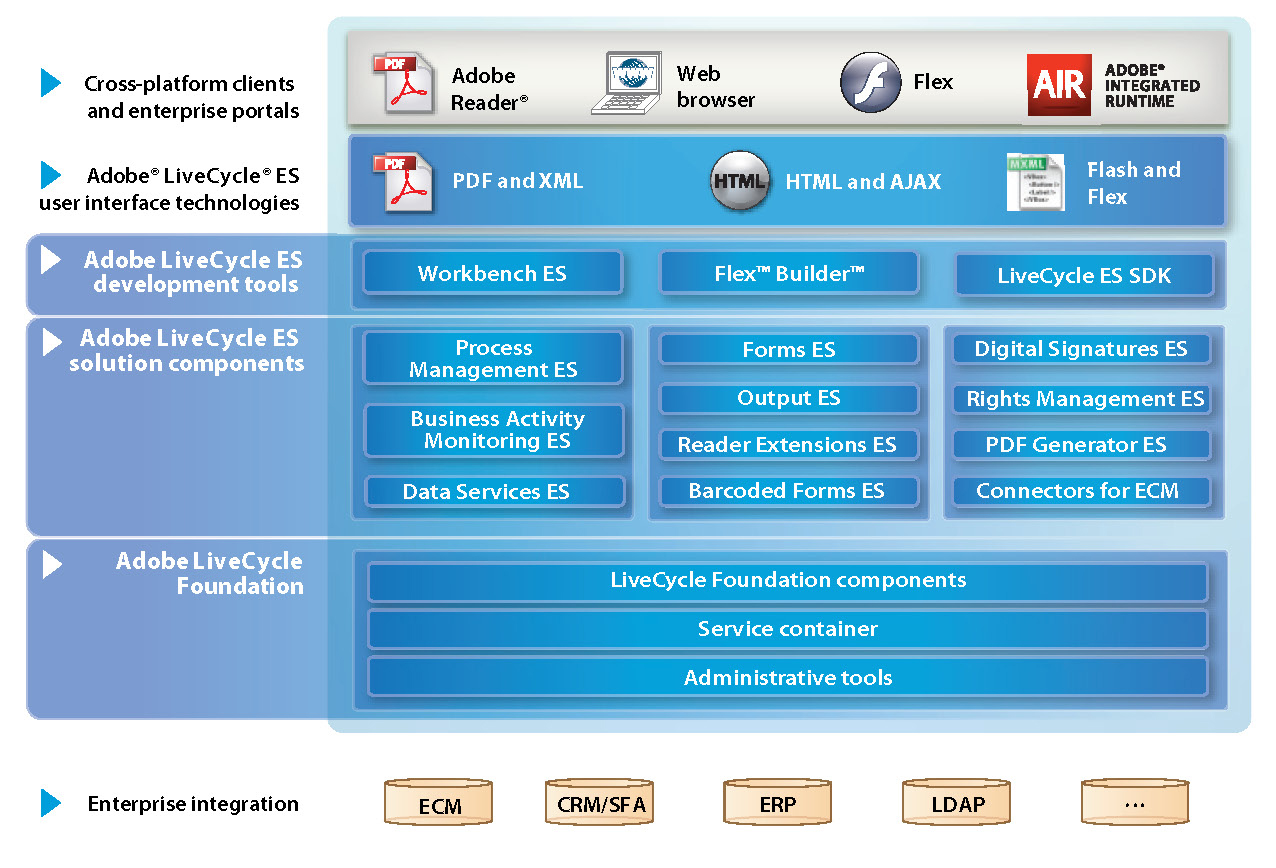
Adobe LiveCycle is made up of 3 business process management tools:  Process Management, Business Activity Monitoring, and Content Services.  The business process management tools are only a portion of the entire package, which also includes an RIA portion (rich internet application) and Document Services for communication, forms, and security features.


"Streamline your enterprise business processes" [1]  The Process Management suite is extremely versatile and contains many ideal capabilities such as a visual process and UI design environment, a centralized repository with versioning, and a "design once, deploy anywhere" work flow.  The PM suite also also for complete customization via Flex programming for the more tech savvy developers but still has advanced code-less deployment as well.

"Maximizing Business Performance with BAM" [2]  The Business Activity Monitoring suite is also completely customizable and has event-driven decision making.  BAM is made up of a dashboard, a workbench, an Analytics Server, and rights management that all work together in tandem.  BAM uses SQL-based semantics to combine events and content in the workbench to meet deliverables in the dashboard.

"Share, Manage, and Retain Content" [3]  The last big piece for BPM in LiveCycle is the Content Management system, which allows you to manage content through enterprise libraries and content connectors.  It enables you to streamline your content reviews and archive content based on retention policy.  And since it's an Adobe product it enables the auto-transformation of content into Adobe PDF files.

(Pictures courtesy of http://www.liventerprise.com/tool/Adobe_LiveCycle_ES/)

Tuesday, January 17, 2012

To Design Software, or to Design Software? The Comparison of Two Common Software Engineering Processes

Last week in my Software Systems Analysis class, we looked at two different perspectives on the Software Engineering process:  one proposed by our Satzinger textbook and one outlined in SWEBOK, the Software Engineering Body of Knowledge.  Below I have matched up the functional areas that I think are related with Satzinger being in red and SWEBOK being in blue.


Functional Areas that Line Up:

  1. Satzinger's first step is to "Identify the problem or need and obtain approval."  I believe this loosely maps to SWEBOK's "Software Engineering Process" phase, which covers "the definition, implementation, assessment, measurement, management, change, and improvement of the software engineering process itself."
  2. The next step in Satzinger's process is to "Plan and monitor the project", which I think binds closely to SWEBOK's "Software Engineering Management" that "addresses the management and measurement of the software engineering."
  3. The next step is to "Discover and understand the details of the problem or need."  SWEBOK's "Software Requirement" maps nicely to this section. 
  4. Satzinger has next to "Design the system components that solve the problem or satisfy the need," which can map to "Software Design" in SWEBOK.
  5. The next step is to "Build, test, and integrate system components."  This lines up with SWEBOK's "Software Construction" phase.
  6. The final phase that lines up between the two is to "Complete system tests and then deploy the solution."  This lines up with "Software Testing" in SWEBOK.

While these are very loose comparisons, there are some aspects of SWEBOK that are not covered by Satzinger or perhaps Satzinger combines them into other functional areas.  For example, SWEBOK details a section on "Software Maintenance."  This section covers what happens to the product after it has gone into production.  Another example is "Software Configuration Management."  This section defines each configuration change so that it can be traced throughout the lifetime of the product.  A third example is "Software Engineering Tools and Methods."  Satzinger does not really have a specific section on the tools and methods used but discussing both through out all his sections.  Finally, "Software Quality" is the last section not fully discussed in Satzinger's version, but just life with the tools and methods section, this too is discussed throughout each section of his process.


While this is a quick and dirty comparison, you should really review all methodologies before starting a project to verify that it will work in your environment with your team.


Friday, January 13, 2012

A Silver Bullet to the Demise of Moore's Law?

This week in my Systems Analysis class we discussed software engineering and the processes one might take in developing a software package based on the Agile fundamentals.  We also discussed briefly Moore's Law and how it's slowly coming to an end.  Although, I did find this article today announcing that IBM is still making leaps and bounds in terms of hardware development.  I guess someone did not tell IBM's techs that they should sit back and relax a while.


So, what do I foresee as being a possible "silver bullet" to combat the fatigue in Moore's Law?  The first thing we can do is to start a science and engineering education initiative in our public schools.  I didn't know anything about engineering before I went to college to become one.  I just knew that I was good at math and science and that computer engineering would be a good place to apply those skills.  But we really need to educate the next generation on what's possible and what real-life software engineers can accomplish.  We need to build momentum!


The next thing that could dramatically change the software development process is to gain buy-in from the community at large.  There are so many types of software development plans out there, and not all of them are applicable to certain situations.  So many companies get into ruts with their software development planning, if they have a plan at all, that they don't not see (or know) that there might be a better solution out there.  We need more places like TopCoder to really build momentum and educate the community around the cause.


The final item that could be a game changer is if a fundamentally new hardware product gets released on the market.  With the development of a new synthetic compound or with a change in how hardware and software interact, the bedrock of software development could essentially change or become obsolete.


In the immediate future though, I don't see there being a "silver bullet" to the werewolf of stalled innovation.  We will need to make significant changes to our culture to encourage and open doors to math and science for all ages, races, and genders.  Or another Steve Jobs.  Or a major break-through in hardware platforms.


Wednesday, November 30, 2011

Finale: Services


The final component of an Internest transaction that we are going to look at is the Service.  There are many definitions of what a service is, but for the purpose of this article, a service is a set of standards that software platforms can use to talk to other software platforms to get and transfer information without a human component.  Below is a diagram of a general set of these standards that are used: a Security component, a Reliable Messaging component, the Transaction, the actual Message and it's language (XML in this case), and the Metadata to put it all together.


There are couple commonly used technologies when discussing Services: SOAP, XML, and WSDL.  SOAP and WSDL are both protocols that utilize the XML language.  Soap is "a lightweight protocol for the exchange of information in a decentralized, distributed environment" and acts as a virtual envelope to send data.  WSDL is then used as the diction and syntax to the message that allows completely different applications to communicate with each other, very similar to the Universal Translator in Star Trek.


The idea of a Service has been around a while, they just have not always been publicly available or documented.  Microsoft is infamous for it's products interoperability, and the words "web service" were first documented as being uttered by Bill Gates at a developer's conference.  EDI was the first to try to develop some type of data interaction.  However, it ended up being costly and hard to implement.  Then once the Web starting gaining ground, SOAP was developed, and that opened the door to the Web service we know today.


Additional Resources:
http://en.wikipedia.org/wiki/Web_service
http://www.w3schools.com/webservices/default.asp
http://www.webopedia.com/TERM/W/Web_Services.html
http://www.businessweek.com/technology/content/feb2005/tc2005028_8000_tc203.htm
http://ws.apache.org/
http://www.ibm.com/developerworks/webservices/
http://msdn.microsoft.com/en-us/library/ms950421.aspx
http://www.innoq.com/resources/ws-standards-poster/
http://www.informationweek.com/news/6506480

Episode 5: Data Storage


The last two parts of the Internet transaction have become specialized throughout the years.  The first is data storage on the server level.  Most people understand data storage on your desktop.  Your hard drive space on your desktop limits you to the amount of documents, videos, and pictures you can store.  Well, this premise can be applied to servers as well except now it's even more important to make all the stored information easily accessible and fast.

There are a couple of different ways to go about data storage on the server level.  You can combine it with your application server if you are running a small environment.  Or it can be its own standalone server.  It can be a SQL database server or a regular file structure based system.  Some examples of storage systems include HP's blade storage system or Apple's XSAN.


Over the years, the idea of storage on a server level has grown.  It initially didn't exist; you had to save back to your computer locally.  But just as with the other services that we've looked at, the demand to collaborative and Internet based business demand storage availability on the server level and in came the NAS solution (network attached storage).  There has since been many advancements in the NAS with RAID algorithms, redundancies built-in, and the SAN, the storage area network.

Windows Storage Server Releases:


Additional Resources:
http://en.wikipedia.org/wiki/Computer_data_storage
http://welcome.hp.com/country/us/en/prodserv/storage.html
http://www.open-e.com/service-and-support/products-archive/products/open-e-dss/
http://blogs.technet.com/b/storageserver/archive/2008/06/09/a-brief-history-of-windows-storage-server-releases.aspx
http://en.wikipedia.org/wiki/Storage_area_network

Episode 4: The Application Server

The next part of the transaction I'll be discussing is the Application server component.  An application server is simply as server that provides an environment for various applications to run.  For example, the Microsoft Exchange server is an application server that runs the Microsoft Exchange application on a Windows Server platform.


The options for an application server are many.  There are a couple of main server platforms as we discussed earlier: Microsoft Windows Server, Solaris, and Linux based such as RedHat.  There are many more types and proprietary platforms as well that are developed for specific applications.  Then on top of all of these platforms, you can run your server applications such as  Microsoft SQL Server.


Over the past years, the definition of an application server has been developed, and its place in the schema defined.  The number of applications that can now be provided on a server level as drastically increased as well.  Application server were initially just static web servers, but with the increase in business online and business platforms that needed to be provided online, they have developed into the massive and various platforms they are today.

Additional Resources:
http://en.wikipedia.org/wiki/Application_server
http://www.answers.com/topic/application-server
http://www.theserverside.com/news/1363671/What-is-an-App-Server
http://technet.microsoft.com/en-us/library/cc750283.aspx#XSLTsection130121120120
http://www.javaworld.com/javaworld/javaqa/2002-08/01-qa-0823-appvswebserver.html
http://searchsqlserver.techtarget.com/definition/application-server
http://java.sys-con.com/node/36451

Episode 3: The Web Server


The next stop on our adventure is the Web Server.  The web server is key to storing and retrieving data on the Internet.  Web servers make web pages possible, which without most people would not have a use for the Internet.  A web server is made up of two components: the hardware that it runs on and the web server software itself which turns a regular server into a web server.

A client uses a web server every time they access a website.  For instance, you are reading my blog right now which is hosted on a web server owned and operated by Blogspot.  You more than likely got here either through a Google search (also a website) or via a direct link.  The direct link should clue you in to a few things.  One, you are accessing my server space here: http://rmoorehead-mist7500.blogspot.com/ then if there is anything after the slash you are access an individual file on the server.  If there is nothing after the slash, you are still accessing a file, you just don't know it.  You are accessing the index file.

So in essence, a web server is very much like navigating your desktop with a file structure of folders and individual files.  The magic comes when a web server receives requests and processes them and sends them back out via the Internet.


The hardware requirements for a web server are pretty basic:  a large storage space, a fast processor, and a permanent IP.  If you'd like to read more about the differences between a regular desktop and a web server, please review this article.  The software is where the fun part comes in.  There is huge competition in the web server arena between Microsoft's IIS platform and the Unix-based Apache offering with Sun bringing up the rear with some specialization optimizations.

Web servers just like user's browser clients have developed over the years.  The concept of the web server and a central repository of information was developed by Tim Berners-Lee in 1989.  And due to it's popularity, Berners-Lee initiated the W3C, the World Wide Web Consortium, to regulate the web he helped to build in 1994. Since then, the concept of a web server has grown.  We now can have virtual web servers and web servers based in a cloud environment in essence taking the hardware component out of the picture.


More Resources:
http://en.wikipedia.org/wiki/Web_server
http://www.webdevelopersnotes.com/basics/what_is_web_server.php
http://computer.howstuffworks.com/web-server.htm

Episode 2: The Internet


Onward!  We shall now traverse through the Internet!  According to the Oxford English Dictionary, the Internet is "a computer network consisting of or connecting a number of smaller networks, such as two or more local area networks connected by a shared communications protocol." [1]  But I think we all could have guessed at that by now.  The Internet has been compared to the Universe model many times as it's a network of stars.  The Internet is made up of two basic technology components:  protocols and structure.

The Internet is defined by it's protocols as you saw in the Oxford English Dictionary's definition.  It's based around hardware and software level protocols.  The hardware that builds the Internet (and it's networks) include routers and switches.  You can read more about routers in one of my earlier blog posts.  The main software level protocol is the IP (Internet Protocol), which is defined and maintained by the Internet Engineering Task Force (IETF).  More about the protocol suite can be found here, but basically, it's made up of several layers of protocols and standards.  The structure of the Internet is based around the "scale-free" network, which is mathematically explained here but basically, the frequency of use by each node in the network determines how many connections that node has to other nodes.  The structure of the Internet is still being debated, but the scale-free model appears to be the best-fit.


The Internet as we know it began development in the late 1960s, early 1970s, with ARPANET and Mark I.  You can find a timeline of events here if you are curious.  Individual groups in education and government worked to develop local area networks that they then interconnected.  With the birth of email in the late 70s, the idea of a public network was introduced.  Then the IP protocol was defined in the early 1980s to standardized all communications.  Also in the early 1980s, the personal desktop became a reality introducing more nodes to the network.  And it has grown in leaps and bounds since then into what we have today.


More Resources:
http://computer.howstuffworks.com/internet/basics/internet-infrastructure.htm
http://en.wikipedia.org/wiki/Internet#Technology

Episode 1: Client Technologies


     As I mentioned in the crawl, I'm going to be starting a 6 episode discussion reviewing some of the basics of Internet Technology.  I'll begin discussing these topics from the client end of the spectrum through to the data end.  Client side web technology can be a very broad topic, but basically, it's made up of three components: the client's platform, the client's software, and what technology is being utilized locally.


The client's platform can be a desktop, laptop, tablet, or mobile device (basic web capabilities or a smart phone); Windows, Mac, Unix, Android, Symbian.  Here are some neat statistics from the website w3schools.com on the platform market share right now for their website.  Basically, Windows has been a dominant market share for a while, but it's starting to lose ground to mobile devices.  The client's software also must be taken into consideration.  There are multiple Internet browser versions available such as Google Chrome or Mozilla Firefox.  Also a client can use an installed application to access resources on the web such as MySQL Workbench or the Evernote mobile app.  Below is a nice graph indicating where we are now with browser distribution.


The technology that is being utilized locally is always changing.  Some of the staples include HTML/cascading style sheets (css), JavaScript, AJAX, and XML.  These all come together to define  what's called the Web 2.0 phenomenon.  You can read more about that here on HowStuffWorks, but basically, different platforms and software can render these different languages into usable information for a user in a graphical user interface, most of the time.  Some people still enjoy their black screens with white text.


http://en.wikipedia.org/wiki/File:Timeline_of_web_browsers.svg

So how has this all developed over the past few years?  Well, one word could sum it up: drastically!  Most major companies such as Microsoft and Apple put out a new line of products (platforms and software) at least each year so the client technology development had to be constantly changing to keep up.  You can read on HowStuffWorks their articles on Web 1.0 and where they think we are going with Web 3.0.  You can also read about the evolution of HTML and where it's going with HTML5.


Additional Resources:
http://en.wikipedia.org/wiki/Client-side
http://en.wikipedia.org/wiki/Web_2.0
http://en.wikipedia.org/wiki/History_of_the_web_browser


Monday, November 7, 2011

Developing in an Ever Mobile World


This week in class we had the opportunity to listen to Chuck Hudson from Control4 speak about mobile application design.  He opened up his talk with a discussion on the "device market", and it's recent revolution from the mobile way of thinking.  It's not about the fact that it's mobile, it's about the devices that client's are trying to connect with, i.e. smart phones, tablets, TV, car displays.  He spoke a bit about the major market players and the market trends.  Android and iOS are leading the pack in the U.S.  He then detailed out the various markets that individuals apps can fall into:

  • pure application sales
  • outside mobile license
  • advertising supported
  • referral/affiliate fee
  • complimentary model
  • in-app purchases


After that we dug right in to the meat of developing an application, starting with the design and the challenges faced by mobile development.  He shared with us the statistic that "1 in 4 apps downloaded are never used."  And that's huge.  There are so many considerations for determining whether an application is going to succeed such as the orientation, the envisioned usage, the platform, space size restrictions.  He also could not more highly emphasize the need to storyboard and protoype as well as test, test, test,  One prototyping program he recommended was Balsmiq (www.balsmiq.com).  He also highly recommended getting involved in user groups such as those located here: developer.android.com and developer.apple.com/ios.

After that, we broke it down to the platform level.  For the Android, we discusses screen resolution support
(4 generalized sizes; 4 size densities), graphics and layout complexity, device testing and compatibility, and device fragmentation.  When developing for the Android, the environment is open sourced (eclipse and the android sdk).  The key differences include a community fed library and diverse widget availability.  The example that we went over is located here.  When you are ready to distribute your app, you can upload it to a couple of different sites, but mainly the Android Martketplace or Amazon.  The process includes code signing, incorporating any marketing information, and submitting to each site.  You also should think about any legal action you'd like to take before making the application public.


We then spoke about iOS development.  iOS development uses an MVC design pattern that is coded in Apple developed objective C.  The development tools are more mature than the Android's since it's been on the market the longest and include xcode, an interface builder, and instruments.  Apple also has the iOS Ad Hoc Program to help get your product in beta testing.  To release your app to the public, you need to add your app, upload it via the Application Loader, go through the certification process by Apple, then release it when you are ready.  Some common issues experienced during this include improper UI usage, over-throttling web request pulls, and memory leaks.

After that we talked about the considerations that need answering before a deployment.

  • Which OS versions do you support?  A good general rule is the current version plus one.
  • How will licensing be handled?  A tip for handling licensing is to balance the level of licensing with the effort needed.
  • Will you implement localization?  If so, how?  And how will you maintain it in the long run?  In-house, contractor, or community group?
  • Beta Test, Beta Test, Beta Test.


Then we talked about how to measure your applications success.  It's unique to each application and it's developer, but you could gauge it by number of installs, amount of traffic, utilize any statistics available through the market, or even create your own measurement by using built-in logging.  You should also have a process ready for supporting your application.  Always welcome feedback, create new updates, and build in code support mechanisms.  A few tips and tricks that he left us with include:  know that development will always be a continual investment; market yourself, get out there and get noticed; test, test, test; and launch!  Don't hold back.  Always look back on your 1.0 version and be embarrassed.


Services! Get Your Services Here!

So what is a Web Service, you say?  According to the W3C, the World Wide Consortium that develops web standards, "a web service is a software system designed to support inter-operable machine-to-machine interaction over a network. It has an interface described in a machine-process-able format (specifically WSDL [web services descriptive language]). Other systems interact with the Web service in a manner prescribed by its description using SOAP-messages, typically conveyed using HTTP with an XML serialization in conjunction with other Web-related standards."  If that just sounded like a bunch of techno-babble, read on!  And hopefully, I'll explain it in plain English for you. 


A web service is a way that one server can speak to another server without any human interaction.  Many online functions can be done with web services, such as online web payments, fraud detection, and package tracking.  There are two primary categories of web services: the "Big Web" service and the "RESTful" service.
The "Big Web" service utilizes XML (extensible markup language), specifically the WSDL and the SOAP standard, to deliver interoperability for remote procedure calls (RPCs) and messaging integration between systems.  The WDSL, the web service descriptive language, is a way to describe the end points of a service call no matter of the format of the message.  The Simple Object Access Protocal (SOAP) is made up of three part: envelope that defines the architecture, a set of encoding rules, and a definition for representing RPCs.  SOAP can be used with many other protocols but primarily with HTTP and HTTP extensible framework.  A "Big Web" service that utilizes SOAP must have these three components:  a formal contract that defines how the web service will interact, must be able to handle complex nonfunctional requirements, and must be able to run asynchronously.  Here are a few examples of  "Big Web" services in action using AJAX: Big Web Examples (IBM)


The "RESTful" service, Representational State Transfer service, limits its architecture to a smaller, standard group of operations such as GET, POST, and DELETE for HTTP making it simple, lightweight, and fast.  This form of web service primarily focuses on stateful resources and the usage of clean URLs.  "RESTful" services can be created in three ways:  using WSDL and SOAP, as an abstraction on top of SOAP, or without SOAP at all. The design of a "RESTful" service is based around resource identification through URIs, having a uniform interface, using self-descriptive messages, and utilizing stateful interactions through hyperlinks.  Here is a similar example to the "Hello World" "Big Web" service example provided above, but this time developed using the "RESTful" implementation:  RESTful Example (Oracle)


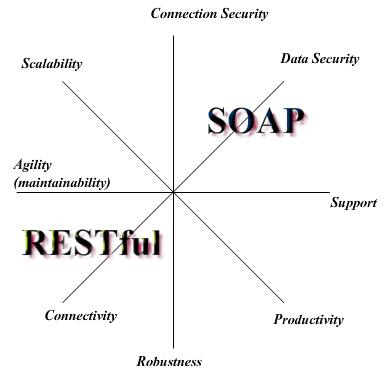
So which one do you use?  When comparing the two types, there are four criteria to review.  The first criteria is how you want to use the web.  "Big Web" simply uses the web as a transport medium where as "RESTful" services use it for publishing information.  The next is how much heterogeneity is needed.  "RESTful" systems rely solely on HTTP data types where are "Big Web" is more robust and allows for more customization to connect to legacy systems written in different language such as COBOL.  Another consideration is how loosely coupled should the interacting systems be, or the client to server relationship.  "RESTful" web relies heavily on HTTP connections, but if the web server is down then no transaction can be performed.  This can be overcome however with dynamic late binding, where the server is located at the time of the transaction.  "Big Web" however does not have either the time/availability issue or the location issue.  "RESTful" web services are better suited for basic, ad hoc integration, such as most things over the web, and are relatively inexpensive to develop since they use a light weight architecture. "Big Web" services are better suited for when quality of service really matters, i.e. enterprise application integration.  "RESTful" web services are also better suited for web applications since most clients can consume them letting the server side evolve and scale.

Well that was a quick and dirty overview of the two main types of web services available.  Please check out the links throughout for some additional reading and my sources.

Monday, October 24, 2011

Green Space: An Eco-Friendly Landscape Company

Green Space is a company that I created for our class midterm. It's a landscape firm that is centralized around the concept of maintaining a "green", environmentally conscious outdoor living space. I developed a website for this fictional company, and it's located here.

Amazon: Putting Your Head In The Clouds


This week in class we are watching this presentation by Dr. Werner Vogels, the Chief Technology Officer and Vice President of Amazon.


The Amazon Cloud was initially developed for Amazon's engineers.  Amazon's product teams work around the concept of "You Build It, You Run It."  After a while Amazon noticed that the productivity of it's teams was going down.  Amazon did a deep analysis of its product teams and found out that a lot of them were spending large amounts of time overseeing the management of their infrastructure, i.e. managing servers, data stores, etc.  That is when the idea of a cloud service was ignited.  Amazon needed to improve its IT infrastructure to better its business processes.

There were many considerations that Amazon reviewed when designing its cloud service.  First and foremost, they wanted to design it for flexibility.  They did not want to limit the innovation of their engineers so it needed to be extremely versatile.  It also needed to be an on-demand service.  Amazon had initially a few hours turn around time on provisioning new servers, but this was not going to be good enough so they developed a completely automated and scalable process for on-demand provisioning and de-provisioning.

Amazon foresaw this new service as becoming the next "utility" offering so they developed a utility-based pricing structure that's benefits them and their clients.  They also needed to break down the transparency of cloud computing to allow for latency management and compliance with local regulations to grow their client base.  Amazon knew from their retail business that they could not make this service a success alone.  They solicited support from an "associates" model and built APIs for companies to utilize and mutually benefit from.  These benefits and additional growth also helped Amazon create additional economies of scale allowing them to continually drive down pricing.  They also needed to look at what services would be universal for all its clients including low pricing, reliability, guaranteed performance, and security.  After all of these considerations were implemented, the Amazon Cloud Service was born.

To read more about the Amazon Cloud Service and its use in IT, check out these recent news articles:

Research and Markets: Cloud: Successful Strategies for Providing Services
Case study: Energy firm scales IT through Amazon Web Services cloud
Clouds vs Outsourcing


Thursday, September 29, 2011

What is a CMS?

By: Blake Haas, Andrew Kuehl, Rachel Moorehead, Berecia Stevens

Definition:
A system providing oversight to manage work flows in a collaborative environment.

Advantages:
  • Control - Content Ownership  and Accessibility 
  • Decrease Costs - Content Creation, Management, and Publishing 
  • Increase Revenues - Time Sensitive Opportunities and Fresh Content 
  • Improve Accountability - Audit Trail and Version Control
  • Maintain Consistency - Presentation Consistency and Brand Integrity 

Disadvantages: 

  • Contains hundreds of files
  • Limited Flexibility in Design 
  • Limited SEO of Web Pages 
  • SEO Maintenance 
  • Slow Loading 
  • Expensive Design 
  • Maintenance Costs

Key Features:
  • A Centralized Repository
  • Workflow Automation
  • Rapid Content Import
  • Dynamic Tracking and Alerts
  • Version Control
  • Automatic Distribution
  • Security

Choosing a CMS:
  • Scope
  • Type of Projects
  • Buy or Rent
  • Quick and easy installation
  • Simple administration interface
  • Quick and easy extension of CMS for extra functionality
  • Simple template manipulation
  • Helpful user community


Examples: